Benchmark scoring
This guide will break down how benchmark metrics are scored, normalised and combined by default and how users can specify their own normalisation schemes. Normalisation of benchmark metrics to yield a unitless score is essential if we want to combine multiple metrics with different units and orders of magnitude into a single overall benchmark score.
Weights and Score Aggregation
The scoring system uses a 5-level hierarchy:
Raw metric values: Each benchmark contains one or more metrics (e.g., energy MAE, phonon max and min frequency MAE, etc.), which are raw values with units.
Normalised metric scores: Each raw metric value is normalised to a unitless score using “good” and “bad” thresholds. These scores can be viewed with the “Show normalised scores” toggle.
Benchmark scores: After normalisation, benchmark scores are calculated as a weighted average of the normalised metric scores within that benchmark.
Category scores: Category scores are calculated as a weighted average of the benchmark scores within that category.
Overall scores: Overall scores are calculated as a weighted average of the category scores.
In general, by default, metrics are equally weighted. However, users can specify custom weights by editing the text box below the corresponding column.
For developers to specify custom default weights, you can do so in the benchmark’s metrics.yml configuration file by adding a weight field for each metric, e.g.:
metrics:
  MAE:
    good: 0.0
    bad: 100.0
    weight: 2.0
    unit: kJ/mol
    tooltip: "Mean Absolute Error for all systems"
    level_of_theory: DMC
See Levels of theory for the full list of accepted
level_of_theory strings.
These weights are returned as part of the tuple from load_metrics_config
DEFAULT_THRESHOLDS, DEFAULT_TOOLTIPS, DEFAULT_WEIGHTS = load_metrics_config(METRICS_CONFIG_PATH)
and should be passed to the @build_table decorator in the analysis file, e.g.:
@build_table(
    filename=OUT_PATH / "x23_metrics_table.json",
    metric_tooltips=DEFAULT_TOOLTIPS,
    thresholds=DEFAULT_THRESHOLDS,
    mlip_name_map=D3_MODEL_NAMES,
    weights=DEFAULT_WEIGHTS,
)
Scoring and normalisation
By default, every benchmark metric is normalised to a unitless score between 0 (worst) and 1 (best) using “good” and “bad” thresholds specified in each benchmark’s metric configuration file (metrics.yml).
In the app, thresholds can be customised for each metric by users to suit their own requirements, by editing the text boxes below the corresponding columns. For example, a phonon expert may have strict requirements for phonon frequency accuracy, whereas a user interested in general trends may be satisfied with a more approximate model.
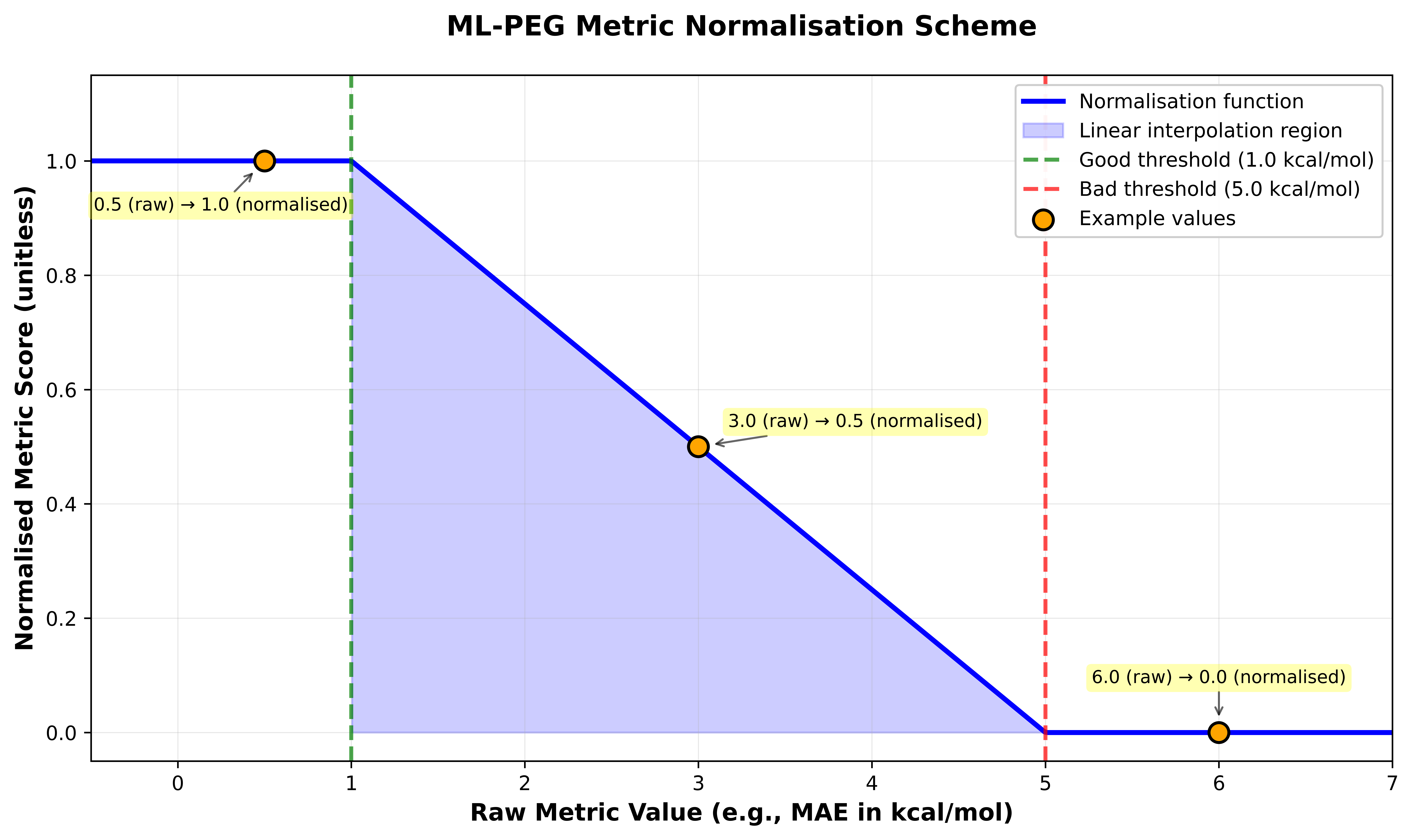
The “good” threshold defines a raw metric value where performance better than this value is considered as good as a user would require. Further improvements in performance beyond this threshold are unlikely to be impactful.
The “bad” threshold defines a raw metric value where performance worse than this value indicates that the model should be avoided for this task.
Default values for thresholds have been carefully chosen for each metric to help users decide in which situations foundation models perform well and are reliable to use, and in which situations they perform poorly and should be treated with caution or avoided completely.
The figure above illustrates the default normalisation scheme used. Here, the normalisation is linear between these thresholds, with scores capped at 0 and 1 outside the thresholds. For example, if a metric has a “good” threshold of 1.0 kcal/mol and a “bad” threshold of 5.0 kcal/mol, a raw metric value of 1.0 kcal/mol or lower will yield a score of 1.0, a raw value of 5.0 kcal/mol or higher will yield a score of 0.0, and a raw value of 3.0 kcal/mol will yield a score of 0.5.
Advanced users can also define their own custom normalisation functions by defining a new normalizer in ml_peg/analysis/utils/utils.py.